


The Moment Everything Almost Slipped Away
Maria had just wrapped a meeting with a promising new client when she got the email a different client, confused and frustrated. They'd sent an invoice two weeks earlier and heard nothing back. Maria stared at the screen, heart sinking. She knew exactly what had happened. The follow-up lived in her head. It lived on a sticky note that had fallen behind her desk. It existed in a vague intention she'd had on a Tuesday afternoon and then forgotten entirely.
>"More leads to track, more emails to answer, more follow-ups to remember. A CRM turns that mess into order by organizing customer data and automating the busywork."The client was understanding. The deal stayed intact. But Maria couldn't sleep that night. She sat at her kitchen table scrolling through vendor reviews, wondering if the answer was a $15-a-month tool that she'd been resisting for two years.
She's not alone. Across the country, small business owners like Maria are hitting a wall that has nothing to do with talent, product, or market. It's the wall of complexity when the number of relationships a business manages outgrows what a single person can hold in their head. That's the moment a CRM stops being optional and starts being essential.
When Does a Small Business Actually Need a CRM?
The answer isn't the same for everyone. A freelancer with 15 clients and a clean inbox probably doesn't need one. A team of three managing 200 relationships with overlapping follow-up schedules almost certainly does.
According to Toolradar Blog's 2026 comparison of 10 CRM tools, most small businesses don't need a CRM at the beginning. "A spreadsheet works fine for 20 contacts and a handful of deals," the guide notes. But somewhere around 50 active contacts, things start slipping. Follow-ups get missed. Deals go cold. The sales process lives in someone's head instead of a system.
That's the threshold. Not 50 contacts as a hard rule, but 50 as an approximate signal that the manual approach has started costing more than it saves. Every missed follow-up is a potential deal lost. Every client who falls through the cracks is a reputation risk. And for many small businesses in 2026, the math has shifted CRMs have become affordable and simple enough that the calculus has changed.
The Core Problem CRMs Solve
At its simplest, a customer relationship management tool does three things: it stores information about your contacts, it tracks where every deal or client relationship stands, and it automates the reminders and follow-ups that humans forget. The best ones do more they integrate with your email, your calendar, your phone system, your marketing campaigns but those three core functions are where the value lives.
CRM.org's 2026 guide describes it this way: "CRMs give small businesses the structure to track leads, nurture customers, and cut admin work. The best options automate follow-ups, log emails, and centralize client info so you can spend more time selling or serving."
That last part matters. The goal isn't to spend more time in software. It's to spend less time managing the administrative chaos of growing a business and more time doing the actual work that builds relationships and revenue.
The Best CRM for Small Business in 2026: What the Research Says
After testing and comparing dozens of tools, the consensus among independent reviewers is clear on a few fronts: HubSpot CRM dominates the free tier, Zoho Bigin leads on price, Pipedrive wins on pipeline visualization, and Monday CRM earns praise for its visual, flexible approach to sales management.
Here's how the landscape breaks down across the six sources reviewed for this piece:
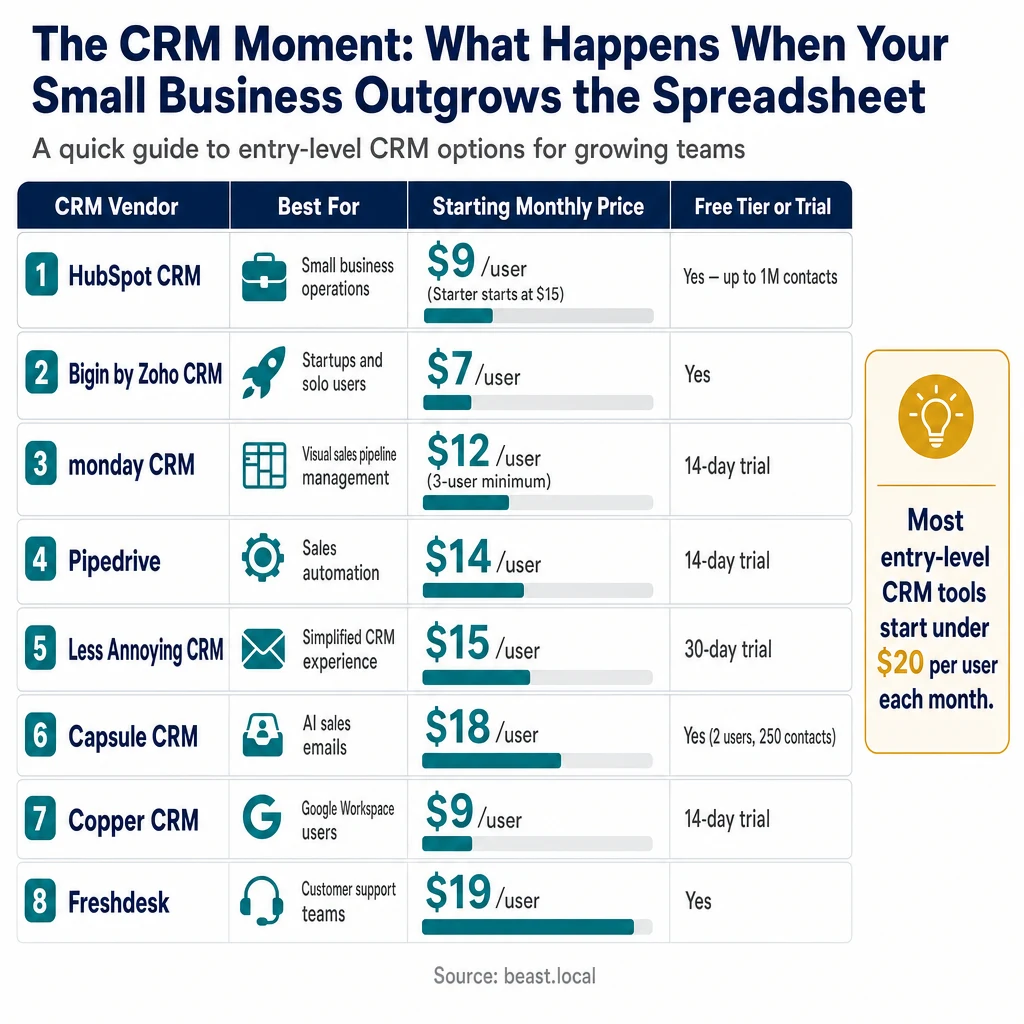
| CRM Vendor | Best For | Starting Monthly Price (Annual Billing) | Free Tier |
|---|---|---|---|
| HubSpot CRM | Small business operations | $9/user (Starter starts at $15) | Yes up to 1M contacts |
| Bigin by Zoho CRM | Startups and solo users | $7/user | Yes |
| monday CRM | Visual sales pipeline management | $12/user (3-user minimum) | 14-day trial |
| Pipedrive | Sales automation | $14/user | 14-day trial |
| Less Annoying CRM | Simplified CRM experience | $15/user | 30-day trial |
| Capsule CRM | AI sales emails | $18/user | Yes (2 users, 250 contacts) |
| Copper CRM | Google Workspace users | $9/user | 14-day trial |
| Freshdesk | Customer support teams | $19/user | Yes |
| Apollo.io | Lead generation and outbound sales | $49/user | Yes |
| Nutshell CRM | Sales reporting and performance tracking | $13/user | 30-day trial |
| Jobber | Field service businesses | $22/user | No |
| Daylite CRM | Apple device users | $15.83/user | No |
Sources: Fit Small Business's June 2026 roundup, CRM.org's 2026 guide, and Toolradar Blog's comparison.
HubSpot CRM: The Free Tier Leader
If there's one CRM that has reshaped expectations for what small businesses should expect at no cost, it's HubSpot CRM. The platform's free tier includes up to 1 million contacts, deal tracking, email integration, live chat, and a meeting scheduler. For many small businesses, free HubSpot is all they'll ever need.
According to Fit Small Business's June 2026 review, "HubSpot CRM dominates small business CRM for a reason. The free tier includes up to 1 million contacts, deal tracking, email integration, live chat, and a meeting scheduler."
The 2025 introduction of Breeze AI expanded the platform further, adding a prospecting agent that researches accounts and personalizes outreach autonomously, a content agent for blog and email copy, and a customer agent for automated support. These features were previously the domain of enterprise pricing tiers.
But there's a catch worth understanding. The free tier now caps at 2 users a reduction from the 5-user allowance that was standard in 2024. For a growing team, this creates a natural inflection point: upgrade to the Starter plan at $15 per seat per month (currently promotional pricing; normally $20), or stick with two users and work within those constraints.
The pricing cliff to watch: upgrading from Starter at $15 per seat to Professional Sales Hub at $90 per seat comes with a mandatory $1,500 onboarding fee. A five-person team moving from $75 per month to $450 per month plus $1,500 upfront is a significant jump that should be planned for, not discovered unexpectedly.
Bigin by Zoho: The Budget-Conscious Alternative
For small businesses watching every dollar, CRM.org notes that Zoho Bigin " offers an inexpensive CRM for tracking leads and pipelines." At $7 per user per month on an annual plan, it's among the most affordable options available. The platform is designed specifically for small teams and solo users who need core CRM functionality without the complexity of enterprise-grade systems.
Zoho's strength is that it operates within a broader ecosystem if your business grows and eventually needs accounting tools, project management, or email marketing, Zoho offers those within the same family of products, often with bundled pricing advantages.
Pipedrive: Built Around the Pipeline
Pipedrive's entire design philosophy centers on one thing: the visual sales pipeline. Every feature deal tracking, stage management, automated reminders, reporting serves the pipeline view. For sales-focused small businesses, this single-minded approach is a strength. Toolradar's 2026 analysis describes Pipedrive as "a sales CRM for moving deals with a drag-and-drop pipeline."
At $14 per user per month with a 14-day free trial, it's priced competitively. The AI Sales Assistant introduced in recent years adds deal predictions, automated task suggestions, and email follow-up recommendations based on deal patterns. It's not as sweeping as HubSpot's Breeze AI, but it's practical for a sales team focused on closing.
monday CRM: When Projects and Sales Live Together
monday.com built its reputation on project management before expanding into CRM territory. For small businesses whose sales work overlaps with project delivery, client onboarding, or campaign management, monday CRM offers a unified workspace that bridges both worlds.
The platform's visual boards and customizable workflows make it approachable for teams that find traditional CRM interfaces clunky or overwhelming. At $12 per user per month with a 3-user minimum, it sits in the middle of the market. The AI campaign management features added in recent iterations help automate outreach sequences tied to specific pipeline stages.
What About Free CRMs? The Real Cost of Free
The question comes up constantly: is there really a free CRM for small businesses? The answer is yes but "free" requires scrutiny. HubSpot offers the most generous free tier in the market. Zoho Bigin has a free option. Capsule CRM includes a free tier for up to 2 users and 250 contacts.
But free always comes with trade-offs. HubSpot's free tier includes its branding on every client-facing communication a subtle but persistent reminder that you're using a free tool. Contact-based marketing pricing kicks in as your list grows, with 2,000 marketing contacts included in the Starter plan and additional contacts billed as extras.
As Fit Small Business's review puts it, "For many small businesses, free HubSpot is all they'll ever need." That's true but "ever need" is doing significant work in that sentence. The question to ask isn't just whether a CRM is free, but whether the free tier will still serve you 12 months from now when your contact list has doubled and your team has added two people.
The Hidden Costs to Watch
Beyond monthly subscription fees, several CRM costs appear frequently in user reviews and expert analyses:
- Onboarding fees: HubSpot's Professional tier requires a mandatory $1,500 onboarding fee. Salesforce's Growth path includes a 30-day trial but the pricing ramps quickly beyond that.
- Per-user pricing: Most CRMs price per seat, which means adding team members has a linear cost impact. Some tools (like Freshsales) include unlimited users on some plans.
- Integrations and add-ons: Calling tools, SMS platforms, advanced AI features, and specialized integrations often cost extra.
- Migration costs: If you outgrow a tool and need to switch, data migration can be time-consuming and sometimes requires professional help.
The tool that looks cheapest on paper may not be the cheapest over a 24-month horizon. Reading the fine print on annual billing requirements, per-user minimums, and feature tiers before committing is worth the time.
How to Choose the Right CRM for Your Small Business
With so many options on the market, the decision can feel overwhelming. Here's a practical framework not a scorecard, but a set of questions to answer for your specific situation.
1. How many people will use it?
This sounds simple, but it narrows the field immediately. Some CRMs have minimum user requirements (monday CRM's 3-user minimum, for example). Others are built for solo users first and expand gracefully. If you're a freelancer, Bigin by Zoho or Less Annoying CRM might serve you better than HubSpot. If you're a 5-person team, HubSpot's Starter plan or Pipedrive may make more sense.
2. Where does your sales work actually happen?
If your team lives in Google Workspace, Copper CRM was built specifically for that environment contacts, deals, and tasks sync natively with Gmail, Google Calendar, and Google Drive. If you're in Microsoft 365, look for CRMs with strong Outlook and Teams integrations. Using a CRM that fights your existing workflow is a fast path to abandonment.
3. What's your most painful problem right now?
Every CRM solves problems, but they emphasize different strengths. If your biggest pain is missed follow-ups, look for strong automation and reminder features. If it's understanding where deals stand, prioritize pipeline visualization. If it's generating outreach content, look for AI writing assistance. Trying to solve every problem at once usually leads to choosing a tool that solves none of them particularly well.
4. How tech-savvy is your team?
Less Annoying CRM built its entire brand around simplicity no complexity, no steep learning curve. Capsule CRM emphasizes a clean user interface and low learning curve. These tools trade some advanced features for approachability. If your team has been resistant to adopting new tools in the past, starting with a simpler platform and upgrading later might work better than buying the most powerful tool that nobody uses.
5. What's your growth horizon?
The CRM you choose today should still work for you a year from now when your contact list has grown, your team has expanded, and your sales process has become more sophisticated. CRM.org's 2026 guide emphasizes that the best options "balance price, usability, and features" but balance looks different at different stages. A startup might prioritize price and simplicity. A more established small business might prioritize scalability and automation.
The AI Inflection Point: What Changed in 2025 and 2026
Two years ago, AI features in CRM software were experimental add-ons that required expensive enterprise tiers. In 2026, they're increasingly standard even at entry-level pricing.
HubSpot's Breeze AI (launched in 2025) brought autonomous prospecting, content generation, and customer support automation to the platform's mainstream tiers. Zoho's Zia AI handles data analysis, email suggestions, and workflow automation within the Zoho ecosystem. Freshsales's Freddy AI provides lead scoring, conversation intelligence, and automated follow-up recommendations.
Toolradar's 2026 comparison documents this shift: "AI features like automated prospecting, content generation, and call intelligence are no longer premium-only they're increasingly standard even at entry-level tiers."
For small businesses, this changes the ROI calculation. A sales team using AI-assisted follow-up reminders and email composition can accomplish more without adding headcount. The question isn't whether to use AI features it's which platform's AI implementation fits your workflow best.
Does Your Small Business Really Need a CRM? A Honest Answer
Maybe. Here's the honest version: if you can run your business without a CRM and not lose deals, miss follow-ups, or wonder where a client relationship stands, you probably don't need one yet. A CRM adds complexity. It adds cost. It adds a new habit to build.
But if you're starting to feel the friction if you're losing track of contacts, missing opportunities, or spending too much mental energy on administrative follow-up the math has shifted. Tools like HubSpot's free tier make it possible to start without financial risk. The cost of not using one starts looking higher than the cost of trying one.
As Toolradar Blog notes, "That's when a CRM pays for itself." The threshold varies by business, but the signal is consistent: when manual tracking costs more than it saves, it's time to consider the switch.
Why This Matters for Zapier Readers
Zapier's audience is built around the idea that small businesses can accomplish more with the right software connections. CRM tools sit at the center of that ecosystem they hold the customer data that feeds email marketing platforms, accounting software, support tools, and communication systems. When a CRM is working well, it becomes the single source of truth for everything that touches a customer relationship.
The good news for Zapier users specifically: the CRMs that rank highest for small businesses (HubSpot, Pipedrive, Zoho, Freshsales, Capsule) all integrate natively with Zapier's automation platform. That means connecting your CRM to your email parser, your project management tool, your billing system, or your customer support queue doesn't require custom development it's available on day one.
The choice you make in a CRM shapes what automation possibilities are available downstream. Starting with a tool that plays well with others even if it's not the most powerful option on paper often creates more long-term value than choosing a best-in-class CRM that exists in a walled garden.
Where to Read Further
If this article helped you understand where you are in the CRM journey, these resources go deeper on the specific tools and comparisons that shaped this analysis:
- Fit Small Business's complete 12-tool roundup including pricing details updated as of June 2026 and methodology notes on how each CRM was scored.
- CRM.org's independently reviewed guide covering 9 finalists after testing more than 25 platforms, with expert vetting from CRM consultant Andrew Chao Daongam.
- Toolradar Blog's honest comparison which includes verified pricing, AI feature details, and explicit acknowledgment of trade-offs in each platform.
Each of these guides includes current pricing, free trial links, and user reviews that can help you move from "should I even consider a CRM?" to "which one fits my specific situation?"